Pie Menu
Info
ZenUV 3 Support Status
We would like to inform you that the documentation available on this web page pertains exclusively to Zen UV 3.
ZenUV 3 Support Notice
Please be advised that active development and technical support for ZenUV 3 have officially concluded. This version is fully compatible with Blender up to version 5.0.
We understand that many of you rely on ZenUV for your professional workflows, and we sincerely apologize for any inconvenience this transition may cause. While we have always strived to provide long-term value, the one-time fixed price paid for ZenUV 3 is no longer sufficient to cover the extensive amount of work required to maintain compatibility with the rapidly changing architecture of newer Blender versions. To ensure the project remains sustainable and continues to meet high standards, we must focus our resources on the next generation of the addon.
Discover ZenUV 5
To take full advantage of the latest advancements in Blender and UV mapping technology, we strongly recommend upgrading to ZenUV 5.
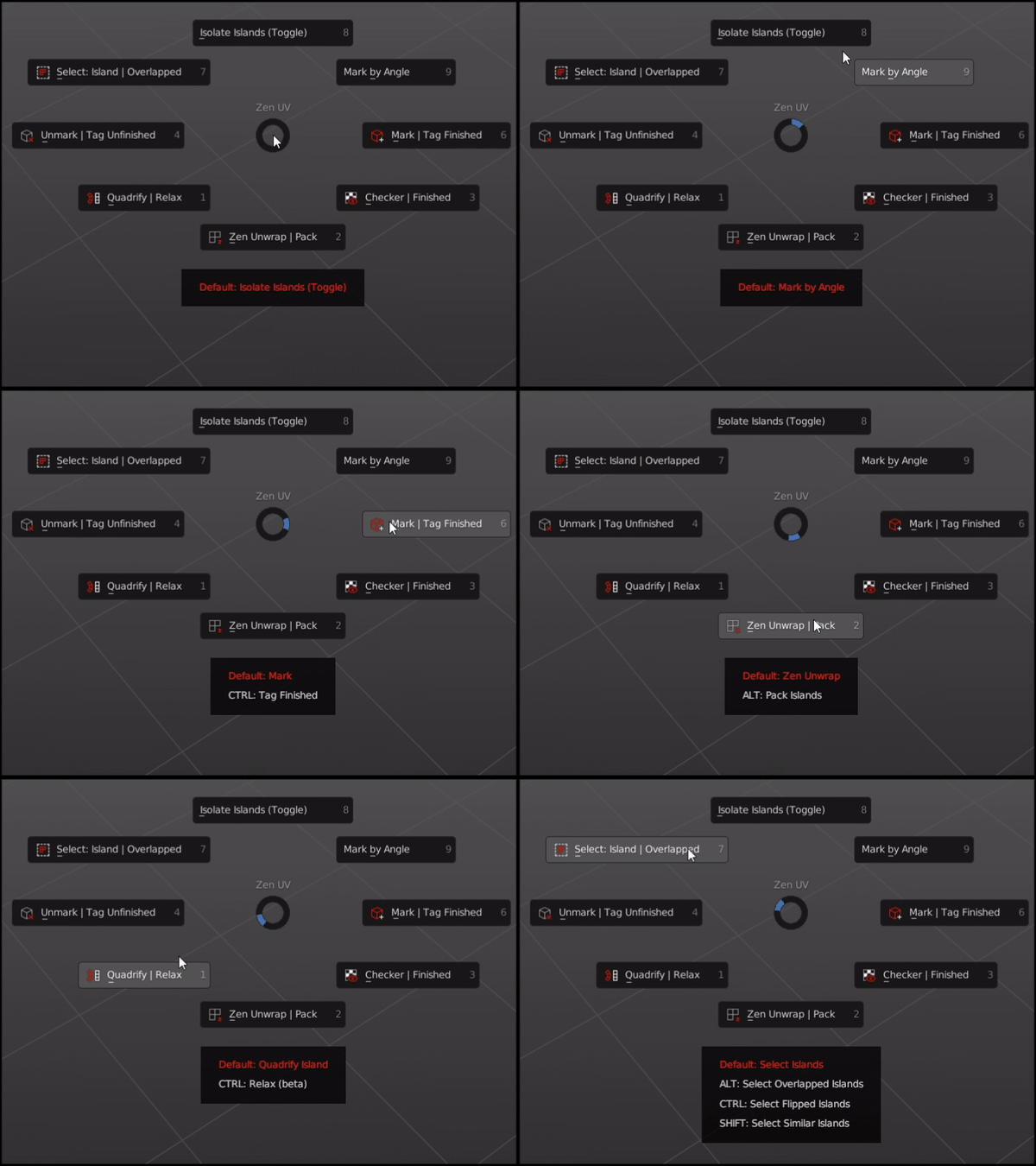
Operators
Quadrify | Relax 
Default— Quadrify Islands. Straighten rectangular-shaped Islands.CTRL— Relax. Relax Selected Islands.
Zen Unwrap | Pack 
Default— Zen Unwrap. Unwrap by Marked edges. If you have selected edges or faces they will be Marked as Seams and/or Sharp Edges and Unwrapped after.ALT— Pack Islands. Pack Islands by chosen Pack Engine.
Checker | Finished 
Default— Checker Texture (Toggle). Add/Remove Checker Texture to/from the mesh.ALT— Display Stretch Map. Display an angle-based stretching map.CTRL— Display Finished. Display Finished Islands (Toggle).
Unmark | Tag Unfinished 
Default— Unmark. Unmark selected edges or face borders as Seams and/or Sharp edges.ALT— Unmark All. Remove all Seams and/or Sharp edges from the mesh.CTRL— Tag Unfinished. Tag selected Islands as Unfinished.
Mark | Tag Finished 
Default— Mark. Mark selected edges or face borders as Seams and/or Sharp edges.CTRL— Tag Finished. Tag selected Islands as Finished. Islands Taged as Finished won’t be unwrapped, recommended to Tag manually changed Islands (e.g. Quadrified Islands).
Select: Islands | Overlapped 
Default— Select Islands. Select Islands by selected edge/face of the Islands.ALT— Select Overlapped Islands.CTRL— Select Flipped Islands.SHIFT— Select Similar Islands.
Isolate Islands (Toggle)
Default— Isolate Islands (Toggle). Isolate Islands by selected edge/face of the Islands.
Mark by Angle
Default— Mark by Angle. Mark edges as Seams and/or Sharp edges by Angle.
Pie Menu Assist
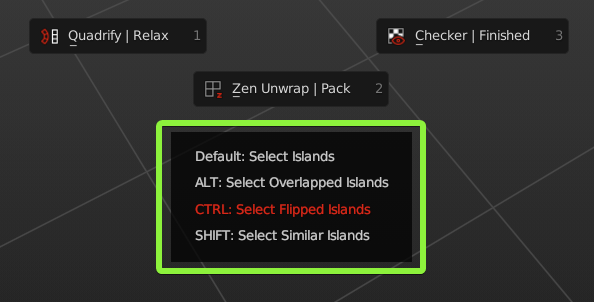
Pie Menu Assist is special help window, which is located below the Pie Menu. There you can find, highlight and execute all the alternative ALT, CTRL, SHIFT Pie Menu commands.
Assist
If you want to disable Pie Menu Assist, you can do it here N-Panel -> Zen UV -> Preferences -> Display -> Display Pie Assist.
Default Shortcut
Zen UV Pie Menu  —
— Alt + U
Shortcut
If you don’t like default Pie Menu Shortcut, it can be changed here Edit -> Preferences -> Add-ons -> Zen UV -> Keymap. Don’t forget to change Shortcut for both contexts Mesh and UV Editor.